
1. Why Every Badminton Club Needs This Open-Source System
Historically, hawk-eye tracking was confined to BWF Super 1000 tournaments and Olympic venues. Industrial multi-camera rigs with dedicated optical fibers easily cost upwards of \$50,000 to \$150,000.
The open-source Good-Badminton framework created by yo-WASSUP shatters this barrier. All you need is:
- 1 standard smartphone (or 1080p 60fps action/security camera);
- 1 standard PC or laptop (Windows, Linux, or macOS; supports CPU or NVIDIA GPU);
- \$0 in software licenses: built on proven open-source computer vision stacks (PyTorch, Ultralytics YOLO, MMDetection RTMPose, Gradio).
Open-Source Repository: Good-Badminton
Author: yo-WASSUP · GitHub Open-Source Badminton Computer Vision Analytics
2. What Tactical Insights Does It Deliver?
With proper court calibration, Good-Badminton automatically computes metrics used by professional coaching staffs:
Footwork Coverage Heatmap
Transforms skewed camera footage into a 2D court projection, highlighting court positioning bias, defensive coverage, and vulnerable court pockets.
Shot Landing Scatter Plot
Plots all shuttlecock impact points across the opponent's side, evaluating drop shot tightness, smash depth, and unforced baseline errors.
Workload & Sprint Distance
Tracks 17 anatomical keypoints to compute rally sprint distances, peak velocities, recovery intervals, and jump smash counts.
Browser-Based WebUI
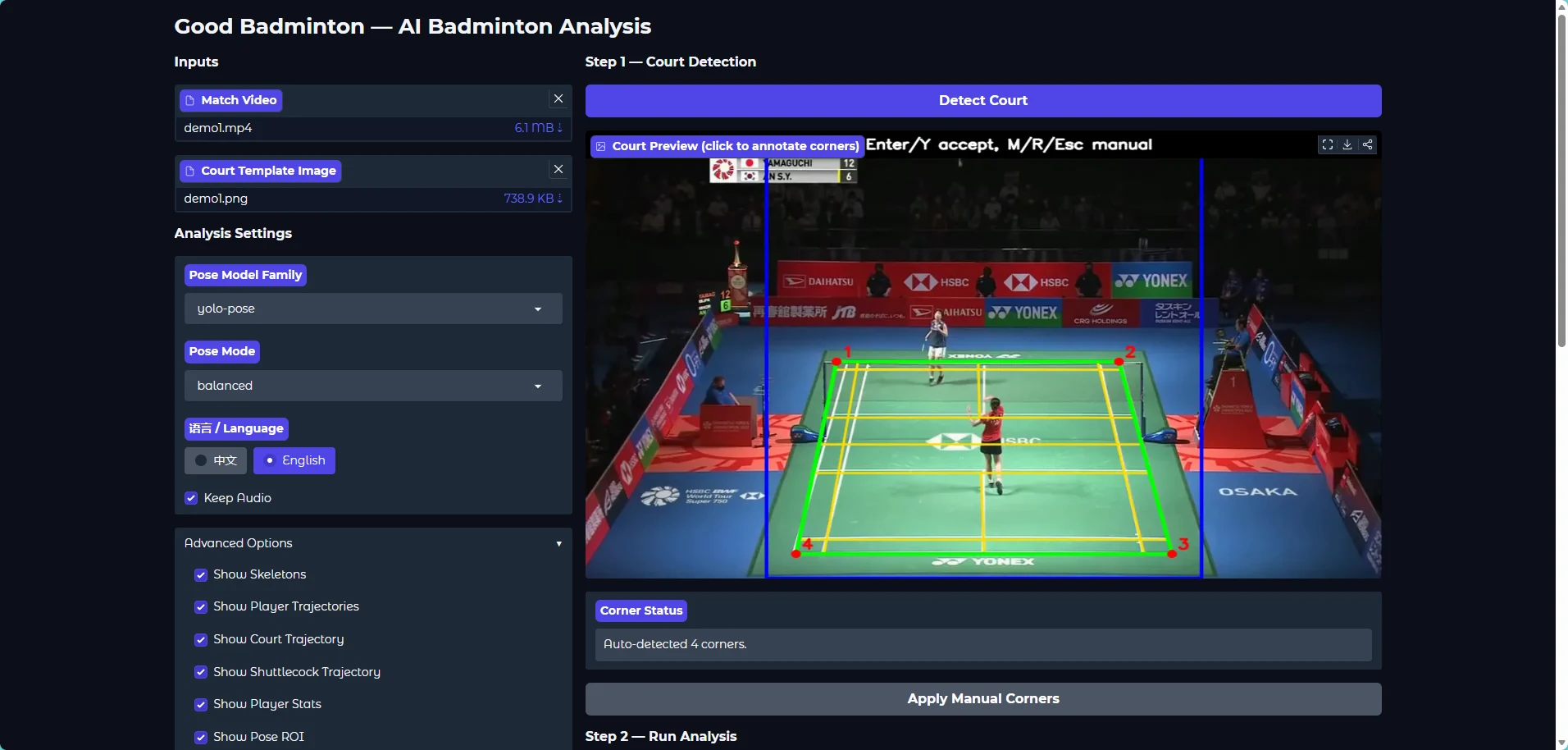
No command line required. Drag and drop match videos into your browser, choose your visualization options, and export annotated footage with audio.
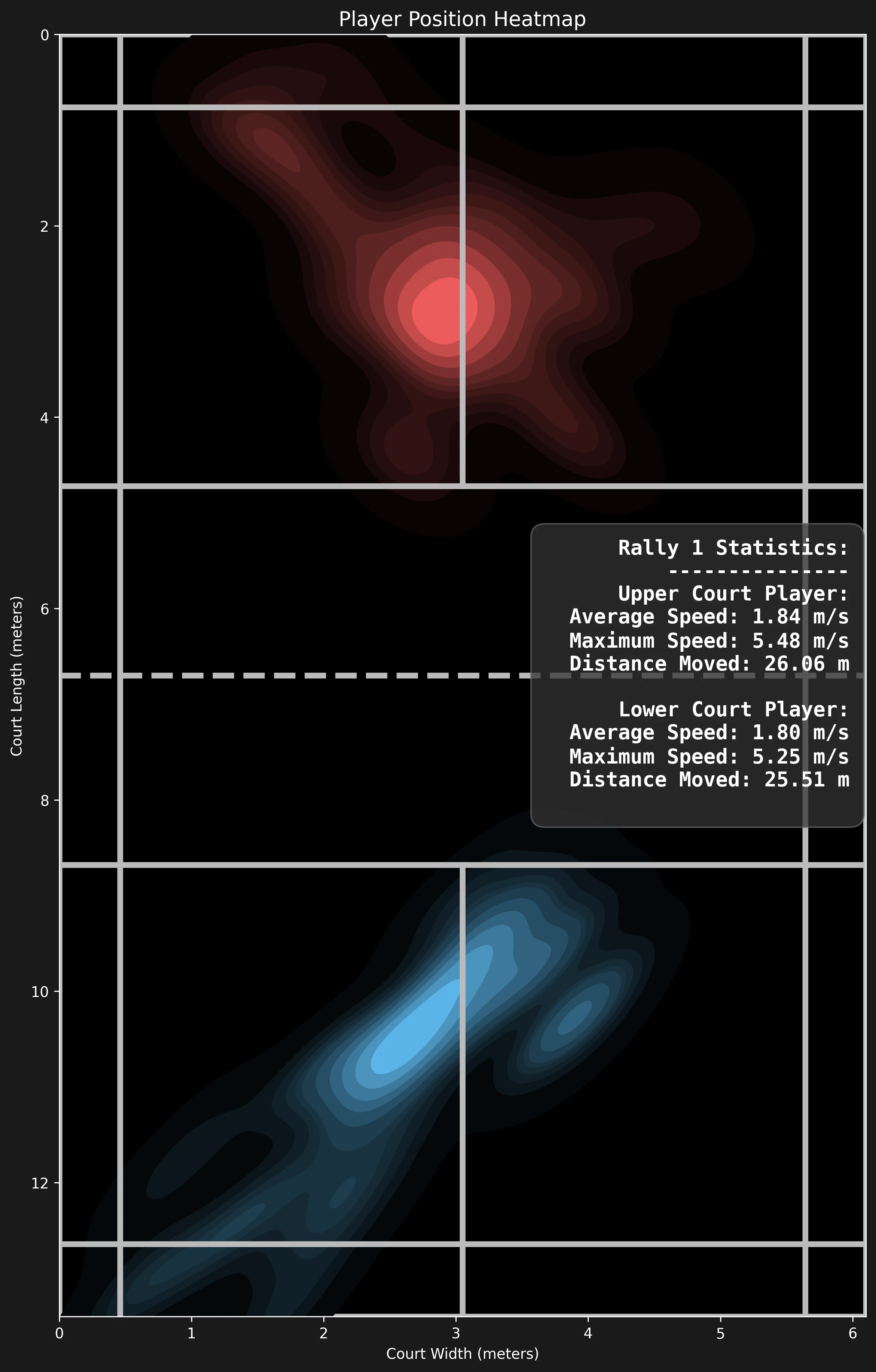
Figure 2: Real-match player court coverage heatmap (center of gravity & defensive gaps)
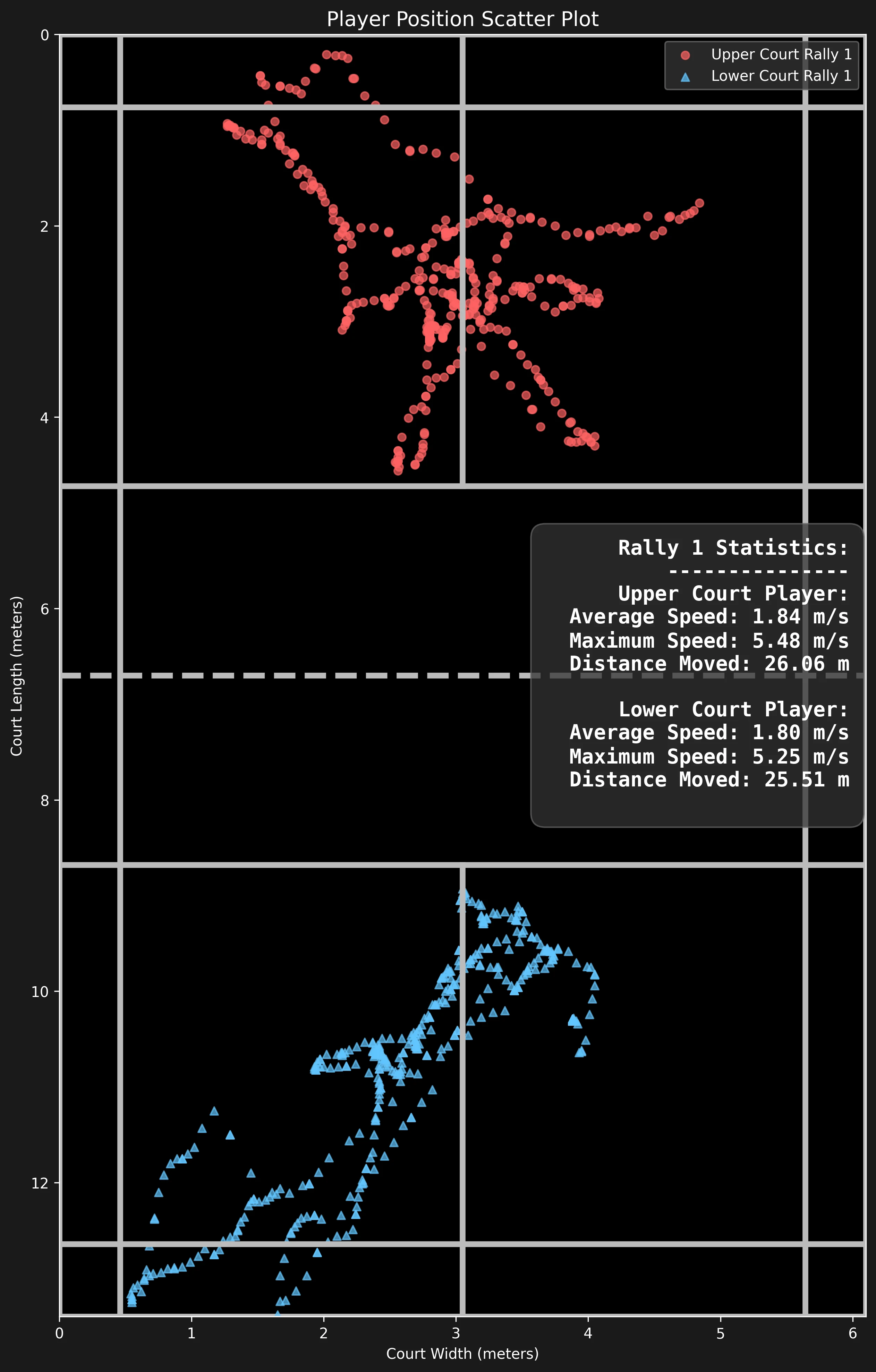
Figure 3: Full-match shot landing coordinate scatter plot (in/out line calls & depth dispersion)
3. Why Do Most Coaches Hit a Roadblock During Setup?
Despite the code being fully open, non-technical users frequently encounter frustrating setup hurdles:
- CUDA & PyTorch Version Conflicts: Mismatches between NVIDIA display drivers and torch wheels, causing the system to fallback to slow CPU mode or trigger DLL load failures;
- Model Weight Download Timeouts: Pre-trained weights (
yolo11s-ball.pt,yolo11n-pose.pt) hosted overseas frequently fail to download or drop connections; - Camera Perspective Rigging Errors: Improper tripod heights create extreme trapezoidal distortion that breaks the 4-point homography calibration;
- Local Network Sharing Issues: Coaches often want to upload videos directly from iPads or phones over local Wi-Fi without knowing how to bind Gradio network interfaces.
4. What Our Free Deployment Support Includes
To ensure every interested coach and club can successfully run this tool, we provide:
📦 1. Pre-Packaged Offline Bundle (Zero-Setup Package)
We have assembled a self-contained archive containing Python 3.10, PyTorch GPU/CPU dependencies, and all required model weights. Simply double-click start_webui.bat to launch the browser UI directly.
🛠️ 2. One-on-One Remote Troubleshooting
Encountering CUDA out of memory, missing C++ redistributables, or virtual environment errors? Our volunteer engineers provide remote guidance via TeamViewer or AnyDesk to resolve technical conflicts.
📐 3. Arena Camera Placement & Calibration Advice
Based on your facility's ceiling height and court orientation, we review your camera rigging and guide you through 4-point court boundary calibration for maximum trajectory accuracy.
🤝 4. Community Support & Upgrade Syncing
Connect with our global network of badminton technologists and coaches to share workflow scripts, tactical drill templates, and upcoming automated shot-classification models.
5. User Experience: Clean & Intuitive Gradio Interface
Once running, analyzing videos is as straightforward as using any standard web application:
Get Deployment Support & Offline Pre-Packaged Bundle
Includes Python runtime and model weights to help arenas, academies, and coaches launch instantly
7. Quick Manual Setup (For Experienced Developers)
If you prefer to configure the official repository manually, follow the standard commands below:
git clone https://github.com/yo-WASSUP/Good-Badminton.git
cd Good-Badminton
# 2. Initialize virtual environment and install packages
python -m venv .venv
.\.venv\Scripts\activate
pip install -r requirements.txt
pip install -r requirements-webui.txt
# 3. Launch WebUI
python -m webui.app
# Open 127.0.0.1:7860
Frequently Asked Questions (FAQ)
Is your deployment assistance for Good-Badminton truly 100% free?
Yes, absolutely free. Good-Badminton is a remarkable open-source project by yo-WASSUP. As badminton tech advocates, we aim to lower the adoption barrier for sports computer vision. We charge no service fees and attach zero product sales requirements.
Can this system run on standard laptops without dedicated GPUs?
Yes. The pipeline supports lightweight YOLO-Pose models running in CPU mode for offline video analysis. When powered by NVIDIA GPUs (such as RTX 3060 or above), it achieves 30–60 FPS real-time processing speeds.
How should a standard smartphone or camera be positioned for optimal tracking?
We recommend mounting the device 2.5–3.5 meters behind one baseline at an elevation of 2.5–3.0 meters with a slight downward pitch. Ensure the frame covers the opposite baseline, both sidelines, and the net top.
How do I request the pre-configured offline package or remote installation assistance?
Simply connect with us via the website contact form or WhatsApp with the keyword [Badminton Hawk-Eye Setup]. Our engineers will share the pre-configured bundle and answer your deployment questions.